Rogue Sandbox - When the Scan Itself is the Payload
How user-granted browser file permissions can transform a trusted scanning workflow into a client-side file modification and infection surface
TL;DR
- Rogue Sandbox is not a sandbox escape; it is a trust-model abuse pattern inside legitimate browser boundaries.
- The critical shift happens when users grant folder-level
readwritepermission through File System Access API. - In this model, narrative design can make write-capable actions feel like harmless scanning or cleanup.
- There may be no classic download moment, yet meaningful local file modification can still occur.
- Chromium can route some write events into Safe Browsing or Download Protection logic, depending on file and policy context.
- The defensive challenge is not only exploit prevention, but governance of browser-granted local file permissions.
Abstract
For years, we have treated the browser as an isolated execution environment. As long as there was no exploit, no downloaded file, and no local executable, the assumption was that a website’s impact on the user’s filesystem remained limited.
Modern Web APIs are beginning to blur that boundary. The File System Access API allows, after user approval, read and write operations over local files and folders. For Web developers, this is a legitimate capability that enables advanced in-browser applications. For an attacker, this is not a new vulnerability. It is a new trust pivot.
The trigger for this research was the Check Point Research article that demonstrated an attack path built entirely on the File System Access API, with no exploit and no local payload. Reading it raised a broader question: what happens when we stop framing this only as browser-based ransomware, and instead analyze the same primitive under a wider threat model?
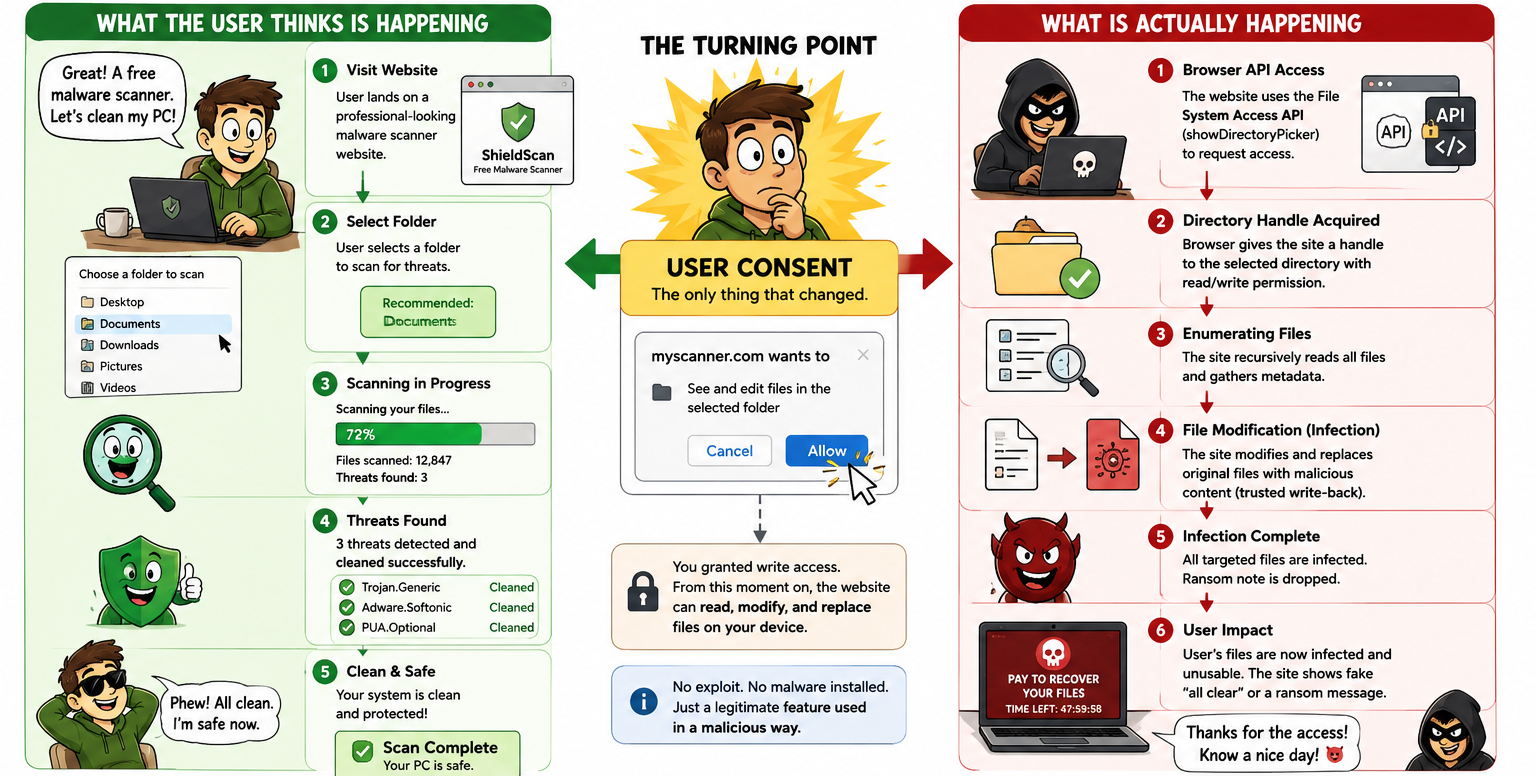
In this article, I present Rogue Sandbox, the research process that led to it, including failed attempts, Chromium constraints, and the relationship to Mark of the Web (MOTW). I then focus on a core insight from the work: in this scenario, there is not necessarily a “download moment”. From the user’s perspective, this is a scan action. From the browser’s perspective, this is write authorization. The gap between those two models is the starting point of this research.
Research Scope
All demos, code samples, and projects presented in this article were developed strictly for research purposes and tested in a controlled lab environment on dedicated test files.
The goal of this work is to document the research process, findings, and insights that emerged during the investigation. If any third party chooses to use the code, ideas, or techniques described here for unauthorized or harmful activity, that use is their sole responsibility and does not reflect the purpose of this research or the author’s intent.
Credit to Check Point Research
Before diving deeper, it is important to provide explicit credit to the research that served as the starting point for this work.
In July 2026, Check Point Research published Browser-Only Ransomware: From LLM Hallucinations to a Practical Attack Technique, showing how an idea originating from LLM output can evolve into a practical attack technique built on the File System Access API. Their work demonstrated that combining social engineering, user-granted permissions, and native browser capabilities can result in local file modification without an exploit, without a local payload, and without bypassing operating system security mechanisms.
For me, that was the “what if?” moment. If a website can, after user approval, obtain write permission to a local folder and operate on files inside it, is browser-based ransomware really the main story? Or is it only one example of a broader trust model?
The Check Point article was the trigger for the research presented here. Everything that follows, from the initial PoC through Chromium source analysis to the Rogue Sandbox model, was driven by the attempt to answer that question.
Background and Motivation
To understand the risk, we need to start with the gap between how users perceive a scan action and how the browser’s permission model actually works.
Over time, average users have learned to be at least somewhat cautious around externally delivered files. An email attachment, an executable downloaded from the internet, or an Office document with macros is usually perceived as an unusual event that may indicate risk.
But when that same user visits a website that looks like a security tool, clicks Scan, and selects a folder through a legitimate system dialog, the suspicion model shifts. From the user’s perspective, this is not running foreign code or installing software, but activating a tool intended to protect their files.
That is exactly the key point.
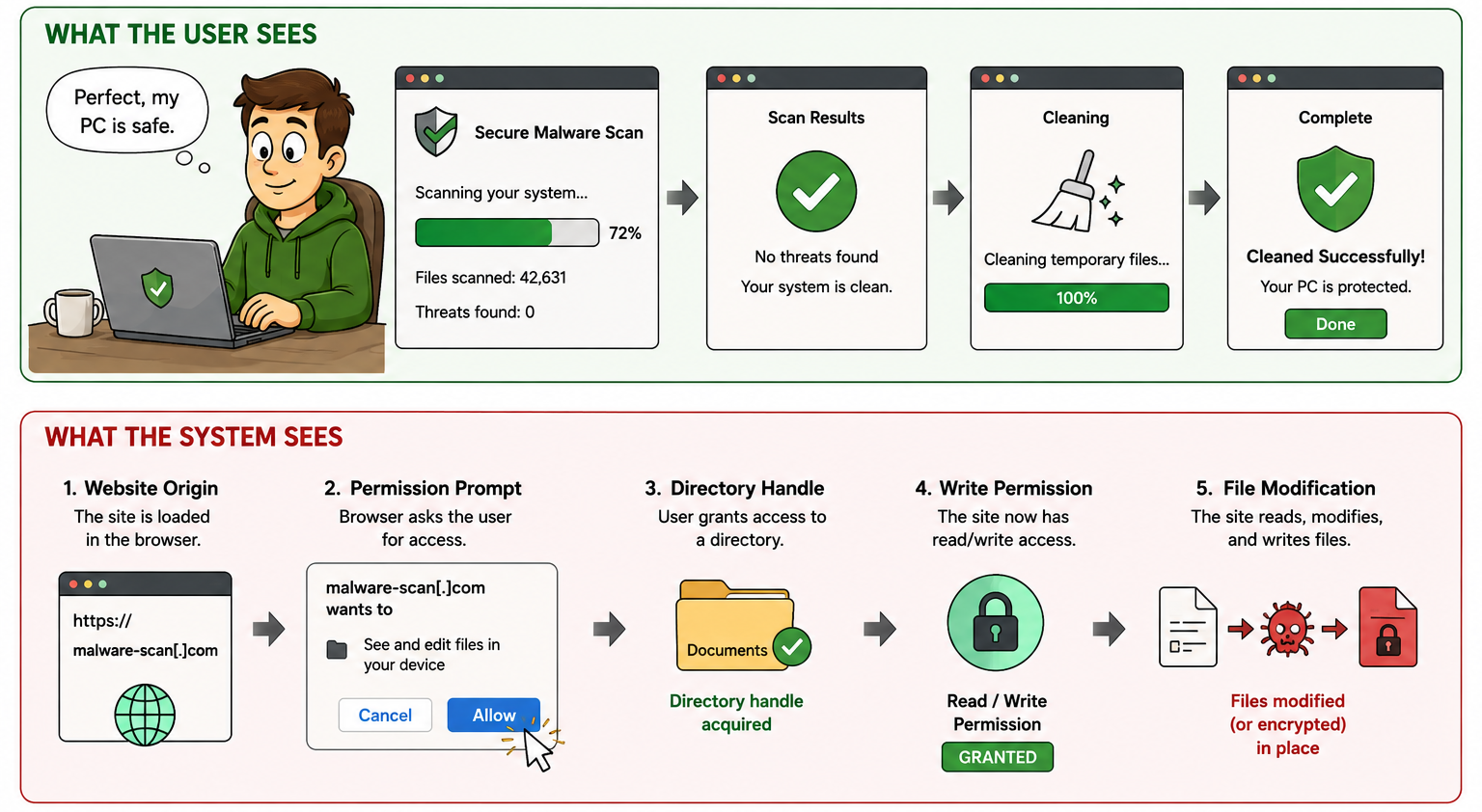
A legitimate scan flow and local file modification can begin with the same permission grant. If the site receives read access, it can map and analyze folder content. If it receives readwrite access, it can also modify files within that folder. From Chromium’s perspective, these are two levels of the same permission family. From the user’s perspective, both may look like a natural part of the scanning process.
This transition echoes previous research focused on abusing trust mechanisms instead of exploiting software vulnerabilities. In my previous iOS article, I analyzed configuration profiles, a legitimate mechanism that allows users to expand the device’s trust circle. The core principle is similar here: not to bypass the sandbox, but to get the user to grant it permission.
The Idea
The Check Point demo used a lure that looked like an AI image enhancement tool. That was a highly logical choice. A user who wants to improve an image understands why the site asks for file access and even expects the file to change as part of processing. During my own research, I chose a different direction.
Instead of an AI tool, I built a flow that looked like a malware scanner. Not because this is the only possible lure, but because it allowed a more interesting research question: how does user behavior change when the user believes they are operating a tool that protects their files?
In that scenario, the user does not expect files to be transformed into a new output, as with image tools. The expectation is that files will be scanned, analyzed, and, when needed, “cleaned”. The defensive narrative makes the permission request feel even more natural. The user does not experience this as granting a website write access to a local folder. The user experiences this as allowing a security tool to do its job.
From the browser’s perspective, however, there is no difference between a site presenting itself as an AI tool, an image editor, or a malware scanner. Chromium does not evaluate the site’s story or declared intent. It checks whether the origin has the required permissions, and if so, allows operations that the API permits under that permission scope.
At that point, the question was no longer whether browser-based ransomware could be built. The question became whether it was possible to build a user experience in which a site perceived as a security product receives readwrite access while the user believes they only started a routine scan.
In other words, I was not primarily interested in whether browser-side encryption is possible. I wanted to understand how a fully defensive-looking narrative can lead users to grant write permission over their own files without experiencing the event as dangerous.
That led to the central research question in this article: can the File System Access API trust model be abused to modify existing files and inject payload content without the user experiencing the event as an infection?
The Question
The first question was simple: is this relevant to Chrome Desktop?
The answer was yes. The File System Access API is supported across multiple Chromium-based environments and allows opening a picker, obtaining a folder handle, and operating on files inside that folder according to granted permissions.
Once that was answered, the more important question shifted.
I was no longer asking only whether browser-based ransomware is possible. I was asking whether a believable scanner experience could be built while the browser receives readwrite permission and can modify local files inside the granted folder.
The research objective was therefore not to prove that browser encryption can happen. Previous work already demonstrated that. The objective here was to map the trust chain:
- What story causes users to approve?
- What does the browser actually show?
- Where are the hard limits?
- What happens on mobile?
- What happens in non-Chromium browsers?
- What happens with sensitive or system folders?
- Does MOTW mark affected files?
- Do defenses focused on downloads even classify this event the same way?
Why Rogue Sandbox?
Precision matters here - Rogue Sandbox is not another name for sandbox escape.
This is not a site breaking isolation boundaries, bypassing Chromium, or obtaining unrestricted filesystem access. The opposite is true. The model is interesting precisely because the browser remains within its intended boundaries: secure context, user gesture, picker flow, user-granted permission, browser support constraints, protected folder restrictions, and permission scope (read or readwrite).
Rogue Sandbox points to something else: a workflow the user perceives as safe.
In security terminology, sandbox typically describes an isolated environment where suspicious files are analyzed without risking the host. In this model, however, the user is not placing a suspicious file into an isolated environment. The user is placing an entire local folder into a web workflow that appears to be a scanner, while that workflow itself may become untrusted.
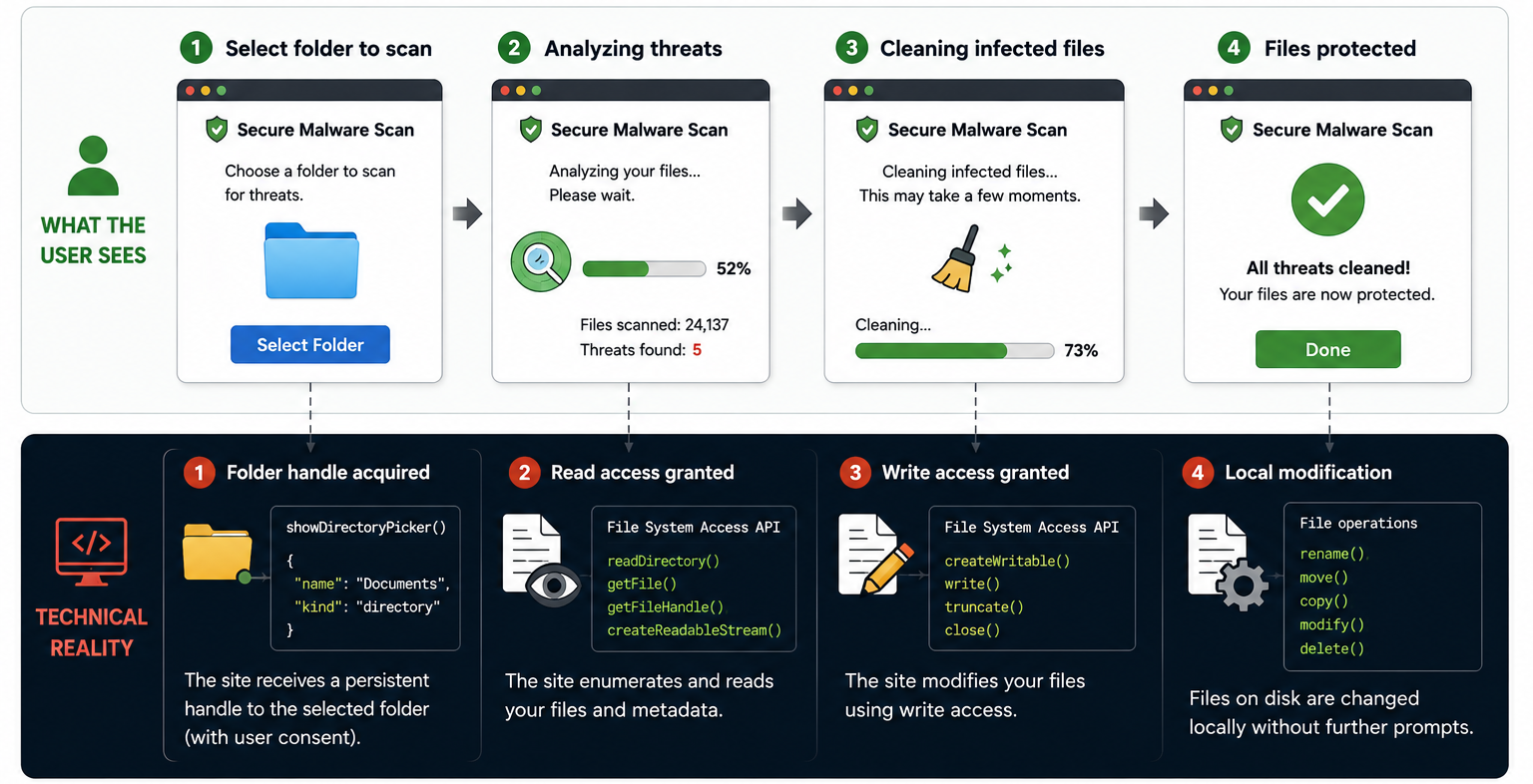
The user sees Scan. In practice, Write may occur. The user sees Clean. In practice, Modify may occur. The user sees Quarantine. In practice, the local file may be altered.
Rogue Sandbox is not a case where the browser escapes its sandbox. Rogue Sandbox is a case where the user puts files into a testing environment that appears safe, while that environment receives the capability to change them.
The Concealment Is Not Technical. It Is Narrative.
In this scenario, the user is not necessarily blind to what is happening. They see a website, a button, a folder picker, a progress bar, and status labels such as Analyzing, Uploading, Cleaning, Quarantining, or Repairing. The activity is often happening in front of them, not behind their back.
The problem is interpretation through narrative.
If the story is malware scanning, users expect file interaction. If the story is AI-powered malware cleanup, users may even accept file edits or repairs as normal behavior. That is exactly where permission becomes dangerous: the same prompt can be interpreted by the browser as “grant website write access” and by the user as “allow scanner to clean files”.
This is a critical point in the research. For the browser, the permission prompt is a formal consent event. For the user, it is often one step toward a promised outcome. If the promised outcome is protection, cleanup, or repair, write access may not be perceived as risky at all.
Deep Dive: File System Access API
What the API Enables Conceptually
The File System Access API was designed to let web applications work with local files in a richer way.
In the older model, a site typically received a file through input type="file" and could read it as a Blob. With the newer model, browser behavior is much closer to local applications: the user selects a file or folder, the browser returns a handle, and the app can perform actions based on granted permissions.
The most important point is that this API is not only about upload. After user approval, it enables reading files and saving changes directly back to local files and folders. When a folder is selected, an app can enumerate its content, iterate entries, request file and directory handles, and build a complete local processing flow.
For legitimate product use, this is powerful and useful. A browser-based code editor needs to open a project folder. An image editor needs to save edits to an existing file. A conversion tool needs to write outputs.
From an attacker’s perspective, the same mechanism creates a different story: the user gives a web process access to local files, and the boundary between scanning and modifying becomes a matter of developer intent.
At a high level:
Pseudo-Code and Source-Level Perspective
// Safe defensive pseudo-code, not an implementation of file modification.
if (!('showDirectoryPicker' in window)) {
	showUnsupportedBrowserMessage();
}

button.addEventListener('click', async () => {
	// Must be triggered by a user gesture.
	const dir = await window.showDirectoryPicker({
		mode: 'readwrite',
		startIn: 'documents'
	});

	const permission = await dir.queryPermission({ mode: 'readwrite' });
	if (permission !== 'granted') {
		await dir.requestPermission({ mode: 'readwrite' });
	}

	// Defensive lesson: this is the trust boundary.
	logSecurityEvent('origin received directory read/write access');
});

As shown above, the browser’s emphasis is the permission decision point, not the downstream implementation of file changes. In practice, browser logic is centered on status and request validation, not on whether the site’s intent is benevolent.
Key clarifications:
Secure Context and User Gesture
The API is not expected to run silently in the background. showDirectoryPicker() requires a secure context (typically HTTPS) and transient user activation, meaning an explicit user action such as clicking a button. If the call is not made from such interaction, the browser should block it.
This is an important safeguard, but it is not sufficient when the model depends on persuading users to perform a legitimate action.
In other words, the user-gesture requirement does not prevent phishing. It prevents automatic picker invocation without user action. If a site can convince a user to click a well-framed button inside a believable narrative, the requirement is satisfied.
Directory Handle, read, and readwrite
When the user selects a folder, the site does not receive a conventional absolute path. It receives a FileSystemDirectoryHandle. The handle represents the selected object and allows operations through the API.
The critical distinction is permission mode: read versus readwrite.
readallows reading and enumeration.readwritealso enables persisting changes and, depending on implementation and permission scope, creating, modifying, or deleting files.
In the Rogue Sandbox scenario, readwrite is the core pivot. Without write access, the story remains scanning, metadata collection, or analysis. With write access, the same story can become fake cleanup, fake quarantine, fake repair, or direct modification of local files.
Primitive-to-Risk Mapping
| Primitive | Legitimate Use | Risk Point |
|---|---|---|
showDirectoryPicker |
Select a folder for local work | User may select an overly broad scope |
FileSystemDirectoryHandle |
Represent the selected directory | The handle turns that directory into the site's working set |
entries() / values() |
Iterate files and subdirectories | Enables local content mapping within granted scope |
getFileHandle |
Access a file inside the selected directory | Operations can affect files the user did not evaluate individually |
readwrite permission |
Save edits or repair files | The critical transition from scanning to modification |
Platform Scope: Not Universally Applicable
At this stage, one point is important to emphasize: this capability is not universal.
Chrome and Chromium are the center of this story. Firefox and Safari do not provide the same full model for showDirectoryPicker() and readwrite access over local folders. By contrast, Chrome/Chromium on desktop and Chrome on Android are the environments where this question becomes practically relevant.
What Happens Under the Hood in Chromium
The File System Access API is split across multiple layers:
- The renderer process where JavaScript executes
- Blink/Mojo interfaces
- Browser-process components responsible for permissions and policy checks
- Permission context logic
- Filesystem backend services
In other words, once a site receives a handle, operations pass through a full browser enforcement chain.
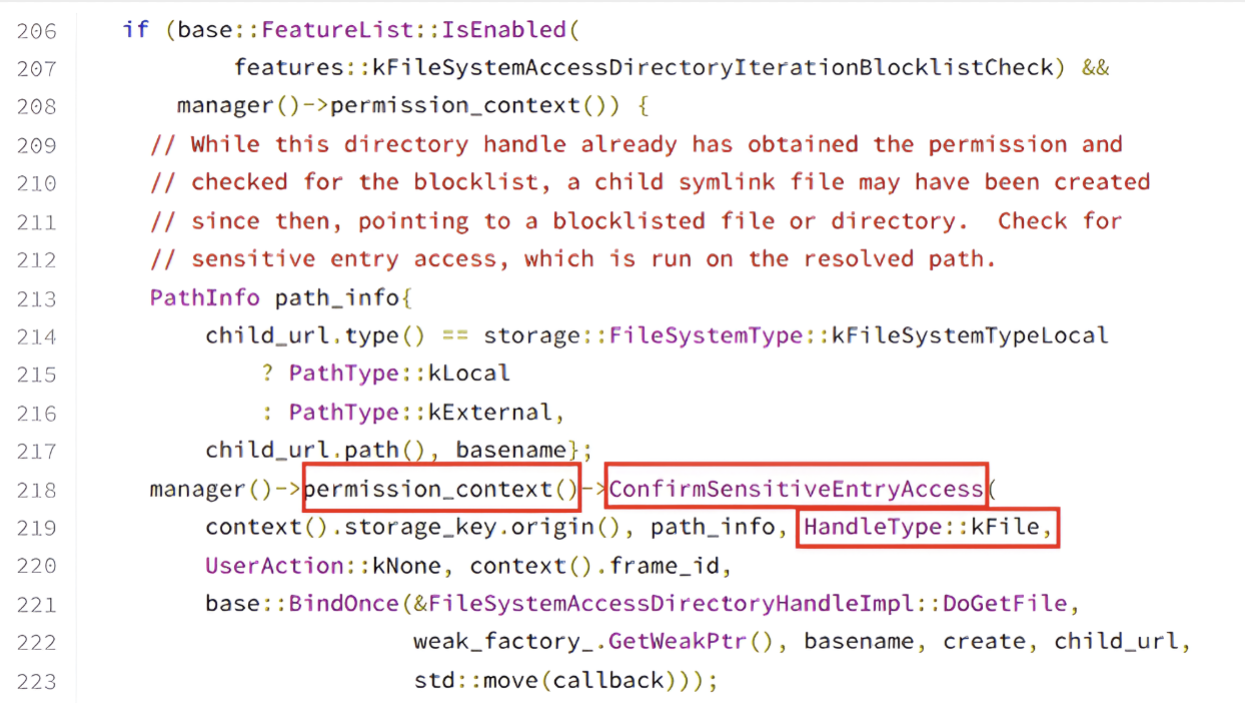
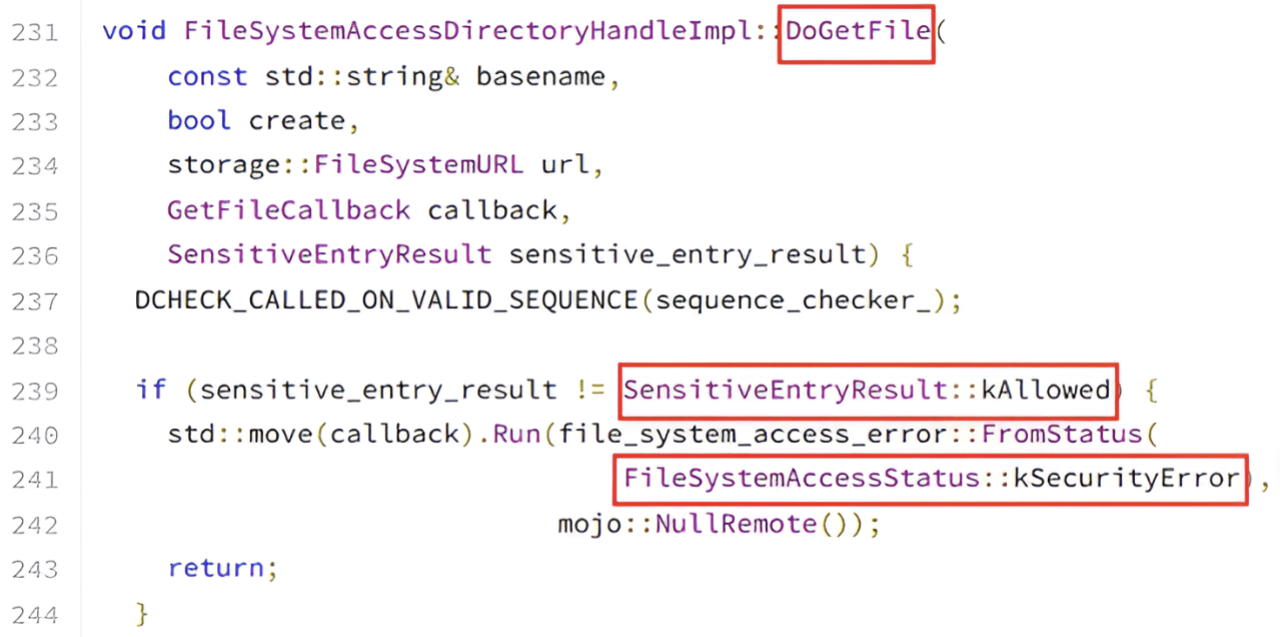
While reading Chromium source code, one of the most interesting points is how access to child entries and sensitive paths is handled. Chromium includes checks intended to prevent previously granted handles from being abused to reach problematic locations, for example via symlink traversal or a child entry that resolves to a sensitive location.
In those cases, sensitive-entry access checks are applied. If the result is not allowed, the operation may fail with SecurityError, or the entry may be filtered from results.
Research Conclusion
The browser does attempt to protect the user. This is not a simplistic “give me C:\ and done” model. There are real checkpoints in the flow.
However, those safeguards do not eliminate the core risk. If the user selects a non-sensitive folder that still contains high-value personal or business files, the API can still enable meaningful impact inside that granted scope.
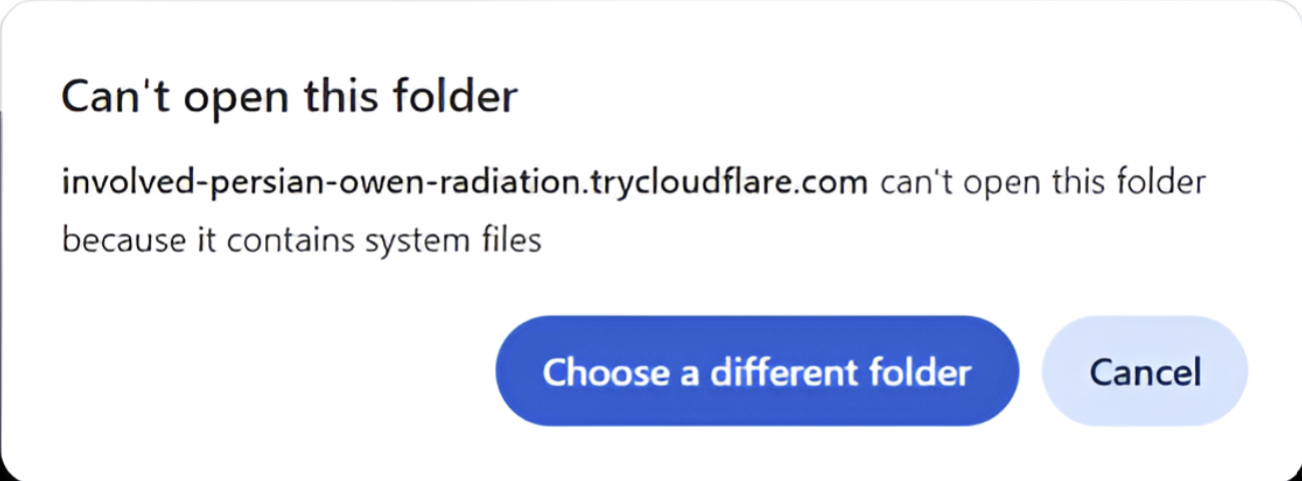
An important point is that the most interesting part is not only that Chromium may return SecurityError in some cases. The key point is the boundary between directories treated as sensitive and ordinary user directories.
System directories, root locations, or browser profile paths may be blocked. But user-selected directories such as Documents, Downloads, Pictures, or a project folder may remain accessible. From an organizational perspective, that is exactly where business value resides, and exactly where an attacker wants to operate: working files, documents, deliverables, presentations, images, source code, and synced cloud files.
From Theory to Practice
Up to this point, the article has focused primarily on the File System Access API permission model, how Chromium enforces it, and the gap between how users perceive a scan action and how the browser interprets it.
At some stage, however, a theoretical model is no longer enough. If a website can obtain readwrite access to a local directory, and the browser validates permission rather than intent, the next question is what can be done with that permission in practice.
The first practical stage in my research was a lab-built browser-based ransomware prototype, inspired by the Check Point research. For me, this stage served as validation: it proved that the model works, that the browser allows the flow, and that a user can reach a state in which they grant write permission over local files without feeling that they executed foreign code.
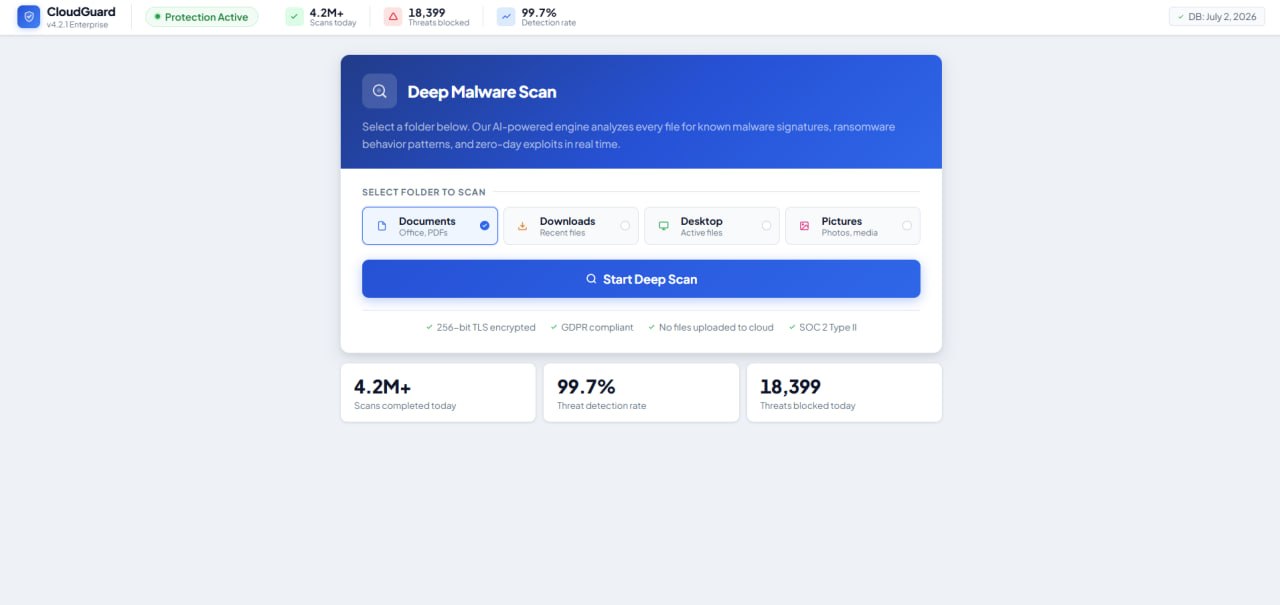
For readers who want to review the ransomware validation code, the publication is available here: Browser-Based-Ransomware
The research direction quickly evolved beyond encryption. Encryption is a dramatic outcome, but it is not the core mechanism. The core mechanism is modification of an existing file under a user-granted permission model.
That shift produced the practical Rogue Sandbox question: can the same trust model be used to alter existing client-side files without the user experiencing the event as an infection?
In simple terms:
- Browser-based ransomware was the trigger.
- Rogue Sandbox is the model.
- Client-side file infection became the research direction.
Client-Side File Infection
The central transition in this phase was moving from file encryption to controlled modification of existing files. Instead of modeling the browser as an actor that encrypts files and displays a ransom screen, I tested a different scenario: a website that looks like a scanner, receives write permission, modifies an existing local file, and writes it back to disk as a changed file.
The key point is that this is not a new-file download event. The user does not receive an executable from the internet, does not open an attachment, and does not run an installer. The user selects an existing folder from their own filesystem, and the full operation remains inside the browser permission model.
For demonstration, I used a controlled and minimal payload that only triggers a MessageBox. This choice was intentional. The objective was not to demonstrate destructive behavior, persistence, stealth, or complex payload engineering. The objective was to prove one specific point: an existing file can be modified so that the change is visible at execution time, and the chain starts with write permission granted by the user.
At a high level, the lab flow was:
- The user opens a website presented as a scanning tool.
- The site asks the user to select a folder for scanning.
- The browser shows a legitimate folder picker.
- The user selects a dedicated test folder and grants
readwritepermission. - The site enumerates files in scope and identifies designated test targets.
- Instead of introducing a new file, the site modifies an existing file within granted scope.
- The modified file is written back to disk.
- In controlled execution of the test file, a MessageBox confirms that the change persisted.
From a research perspective, this is the difference between download and trusted write-back. In the classic model, a new file enters the system from an external source. Here, a file that already exists on the system is modified through an action the user interpreted as scanning or cleanup.
This experiment was not meant to show arbitrary code execution by the browser. The browser does not gain unrestricted local execution, does not gain unrestricted disk access, and does not bypass Chromium isolation boundaries. The research is interesting precisely because it stays inside browser constraints.
The capability tested is narrower and clearer: after user approval, can a local file be read, modified in a controlled client-side process, and written back to its original location via the File System Access API?
That is why the technical emphasis in this section is the operation chain rather than sophisticated payload behavior:
- Obtain a directory handle after explicit user approval.
- Identify explicitly designated test files in a lab environment.
- Read and analyze file structure at browser level.
- Apply controlled, reproducible file-content modification.
- Write the file back to its original location.
- Verify persistence of the change after browser closure.
In full implementations, modification details are file-type dependent. For PE files, random byte edits are not sufficient. To keep a file valid after modification, the file structure, section boundaries, entry point behavior, and Windows loader interpretation all matter.
Technical Limitations
During implementation, one point became clear quickly: client-side file infection is not trivial.
A browser is not a classic malware-development environment. There are memory limits, performance limits, API limits, browser-specific constraints, and full dependency on explicit user action.
In addition, not every file is a suitable candidate for modification. Signed files, structurally complex files, very large files, or files protected by security products may fail, be blocked, or break in a way that prevents execution. That is why the demo focused on controlled test files and a minimal payload.
The conclusion is not that every website can infect every file.
The conclusion is that the boundary between a web workflow and meaningful access to local files is narrower than many users assume.
Building the Story: The Narrative Is Part of the Technique
At this point, it is important to return to a non-purely-technical point that is still critical to the research: the story shown to users is not decoration. It is part of the mechanism that enables permission.
The File System Access API requires user action. A picker cannot be opened silently in the background without interaction. Because of that, the entire model depends on how users are persuaded to perform a legitimate action they believe belongs to a safe process.
This is why I built the flow around a malware scanner narrative. Users expect such a product to touch files: read, analyze, detect, and sometimes “clean” them. The word clean creates a psychological bridge between read and write. The user thinks in terms of repair. The browser evaluates write permission.
The full flow was designed around several UX principles:
- Browser compatibility checks early in the process to reinforce product credibility.
- Folder selection through native browser picker flows, not a classic upload pattern.
- Language centered on Scan, Analyze, Clean, and Protect rather than Modify or Write.
- Low, gradual threat counters to keep the experience plausible and non-theatrical.
- Progress bars and action logs that look like routine scanner activity.
- A positive completion state that signals “files are protected,” while file changes may have occurred.
The point is not that the user sees nothing.
The opposite is true: the user sees a lot, including process states, counts, and success messaging. The concealment is not the absence of UI. The concealment is that the UI frames technical actions as a different story.
That is narrative hiding.
The user sees “cleanup”. The system sees write. The user sees “protected files”. The file sees modification.
Injection Architecture
The demonstration architecture was built around one simple principle: all meaningful processing happens client-side.
There is no local agent installation, no native binary execution, no browser exploit, and no JavaScript-to-native escape. The site runs inside the browser, uses the File System Access API, receives a FileSystemDirectoryHandle for a user-selected directory, and performs processing through JavaScript over files within granted scope.
In this model, the server is not the primary component. It can serve the website, support UI state, collect research telemetry, or host demo assets, but the file-modification process itself occurs in-browser.
Architecturally, the demo contains several layers:
- Narrative layer: the website experience shown to the user.
- Permission layer: picker interaction and handle grant.
- Scanning layer: traversal of files under selected scope.
- Filtering layer: selection of relevant test candidates only.
- Binary-processing layer: file read as
ArrayBufferand validation. - Controlled-modification layer: deterministic change on suitable files.
- Write-back layer: persistence to original location using granted write permission.
- UI layer: action represented as scanning, cleaning, or repairing.
Client-Side Infection Pipeline
The central implementation element is JavaScript that performs client-side processing and controlled file modification.
This article does not publish a full operational infection recipe. The goal here is to explain the model, the architecture, and the constraints required for a browser-contained implementation to be feasible.
The pipeline starts only after the user selects a folder and the browser returns a FileSystemDirectoryHandle. From there, code iterates entries, checks which files are relevant to the research, and skips anything outside defined criteria.
That filtering stage is essential. Not every file is a viable candidate. Some files do not match the required format, some are too large for practical browser-side processing, some should be excluded by policy, and some are simply irrelevant to test objectives.
The implementation therefore used a fail-closed approach: if a file does not satisfy predefined constraints, it is skipped.
In practice, filtering considered parameters such as:
- File type and extension.
- File size thresholds.
- Path relationship to selected scope.
- Names and directories on explicit skip lists.
- Files already processed.
- Files that cannot be read or written.
- Files whose structure fails validation checks.
- Dry-run or test-mode state.
Only after passing filtering is a file read into memory through its handle. At that point, processing happens over ArrayBuffer or Uint8Array, i.e., binary representation in-browser.
For controlled demonstration, a MessageBox-only payload marker was used intentionally. The objective was not damage, stealth, persistence, or complexity, but a clear observable proof of behavioral change without introducing unnecessary aggression.
In short, MessageBox is not the end goal. It is a marker.
After processing, code creates a modified in-memory version and writes it back through the File System Access API itself.
There is no classic new-file download to Downloads, no attachment event, and no installer event. The browser uses origin-scoped write permission to open a stream and persist updated content into an existing local file.
This is where “no download moment” shifts from a psychological claim to a technical one.
From an attacker-visibility perspective, this is significant: the user did not download a new artifact. They selected a folder, initiated a scan-like workflow, and the local file changed in place.
What the Code Must Account For
The first constraint is environmental: the browser is not a natural malware-tooling environment. There is no unrestricted filesystem access, no arbitrary background execution without interaction, no full-disk visibility, and no bypass of Chromium policy boundaries.
Everything depends on what the user selected and what the browser agreed to expose.
Because of that, implementation must be defensive around handles, permission states, and errors. Any step can fail: the user can cancel selection, the browser can block sensitive directories, files can be locked, permission can remain read-only, or the API may not be supported in the current browser.
In the research implementation, each of these conditions had dedicated handling. That is not because it changes the core idea, but because it is what separates a theoretical concept from a functioning proof-of-concept.
A PoC cannot assume universal success. It must validate support, validate permissions, validate file candidates, skip exceptions safely, and preserve a stable user-facing flow even when only part of the scope is processable.
The second constraint is memory and performance. Browser-side binary processing relies on buffers and may involve large files. Practical implementations need size limits, staged processing, incremental UI updates, and avoidance of long main-thread blocking.
The third constraint is post-modification validity. If the objective is to demonstrate controlled infection, modified files need to remain valid enough to demonstrate behavior change. That means no blind writes: structure-aware processing is required to avoid immediate corruption.
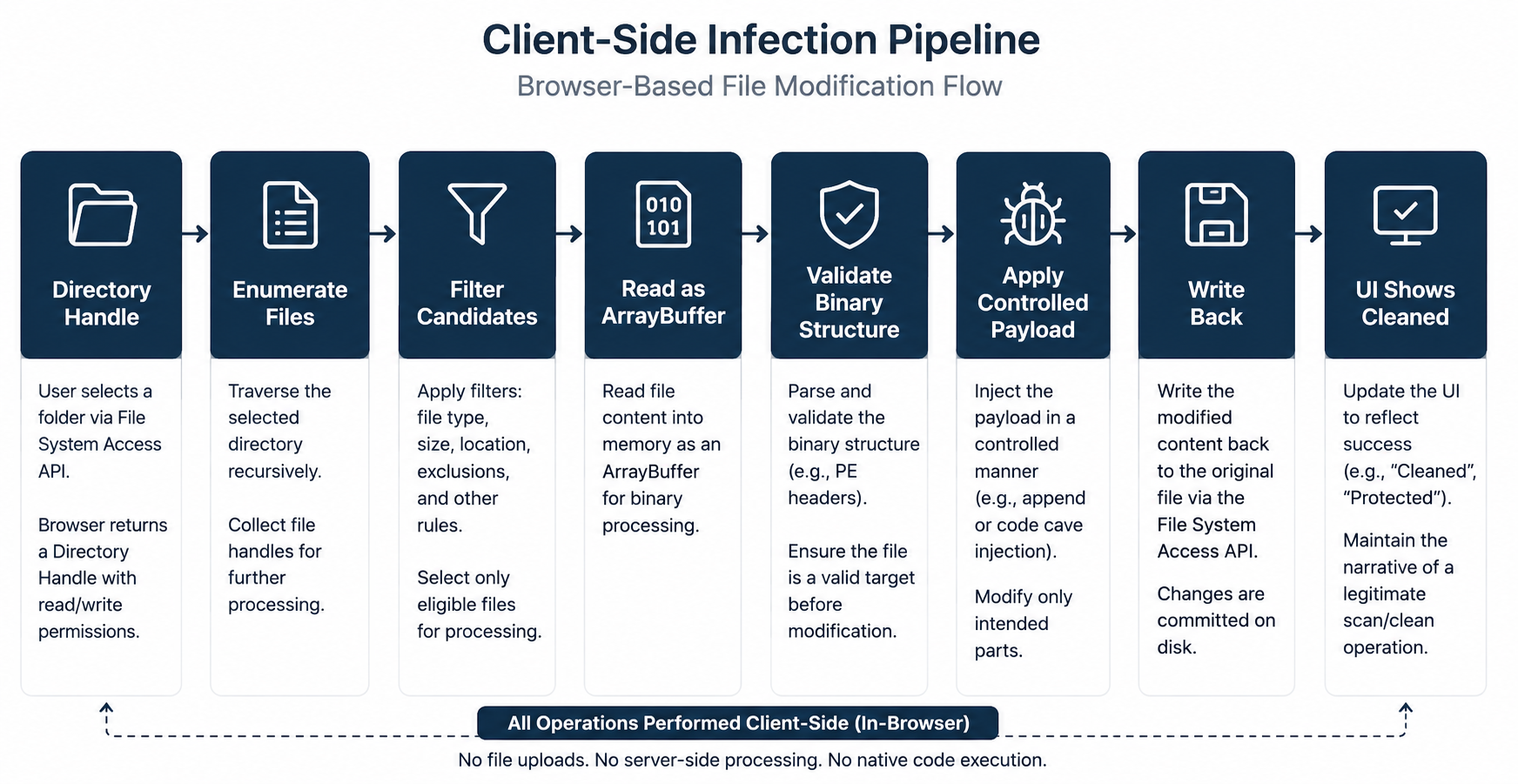
The practical implication is that JavaScript is not “just UI” in this model.
It becomes a local processing layer that receives filesystem input, applies binary logic, and writes content back to disk through a legitimate browser permission boundary.
That is exactly where Rogue Sandbox becomes operationally meaningful.
The environment the user perceives as a scanner is not only presenting results. It can become a real processing environment. And once that processing environment holds write permission, the boundary between “inspection” and “infection” becomes fully dependent on the intent of code running in-browser.
Mark of the Web: When You Edit a File Instead of Downloading It
Research Credit
Sagi Olshansky raised the key Mark of the Web (MOTW) question that shaped this chapter.
One of the most important questions in this research was Mark of the Web (MOTW).
In classic Windows scenarios, when a file arrives from an untrusted source such as an internet download or email attachment, the system may mark it using Zone.Identifier. That marker is consumed by applications and security controls, for example by Microsoft Office when deciding whether to block macros in internet-origin files.
In the Rogue Sandbox scenario, the framing is different. There is not necessarily a newly downloaded file. Instead, an already-existing local file may be modified by the browser. The research question therefore became: is MOTW still relevant when the event is edit rather than download?
To evaluate this, I tested three separate cases:
- A lab-created local file with no MOTW, then modified through the browser.
- An internet-origin file already marked with MOTW, then modified through the browser.
- A new file created or written by the browser through the File System Access API.
After deeper analysis, the core conclusion is that MOTW primarily answers a provenance question based on how the file is represented in its current filesystem state. Editing by a website does not automatically reclassify a file as internet-downloaded in the Windows trust model.
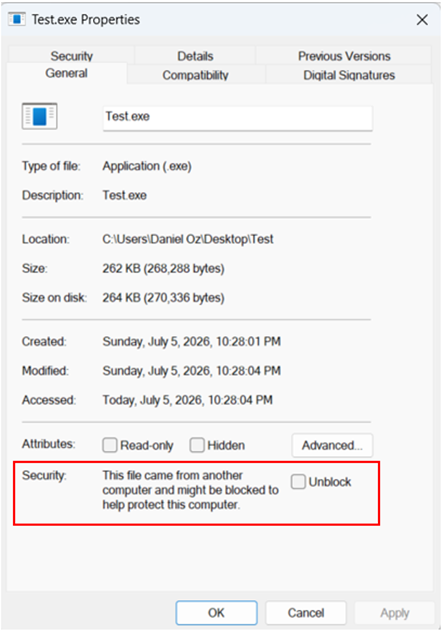
SmartScreen and What Happens When There Is No Download
One of the more surprising findings in this research appeared when testing write-back to existing files through the File System Access API.
Until that point, I treated this flow as outside the classic download-security path. The user did not download a new internet file. There was no download shelf event, no new artifact in Downloads, no Content-Disposition flow, and no event that looked like a traditional download.
At a high level, the sequence looked simple:
In practical testing against Chrome, however, the picture was less clear-cut. In some cases, when the site attempted to write back specific files through the File System Access API, Chrome triggered protections associated with Safe Browsing / Download Protection.
This became an important point in the research because it challenged an early assumption: the absence of a classical download event does not necessarily mean the browser completely ignores file risk.
That is exactly where this chapter becomes interesting.

Most people associate Safe Browsing primarily with phishing pages, malicious websites, or suspicious downloads. That is indeed a central part of the mechanism. Google describes Safe Browsing as a system that warns users when they attempt to visit dangerous sites or download harmful files and applications, and Enhanced Safe Browsing can apply deeper analysis options for downloaded content.
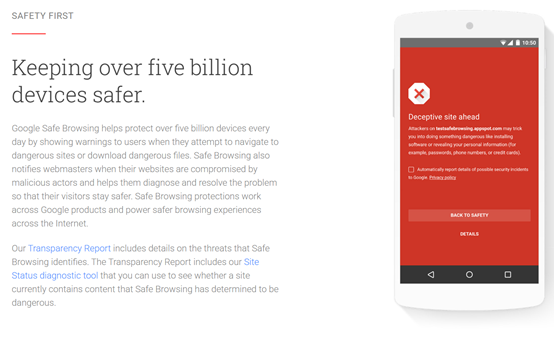
Chromium also includes a dedicated path that bridges File System Access write operations into the Download Protection stack. In Chromium source code, there are dedicated components such as check_file_system_access_write_request.cc and file_system_access_metadata.cc, and in download_protection_service.cc there is an explicit function named CheckFileSystemAccessWrite.
In other words, from Chromium’s perspective, writing through the File System Access API is not always treated as “just file editing”. It can be elevated into an event that passes through Safe Browsing / Download Protection inspection logic.
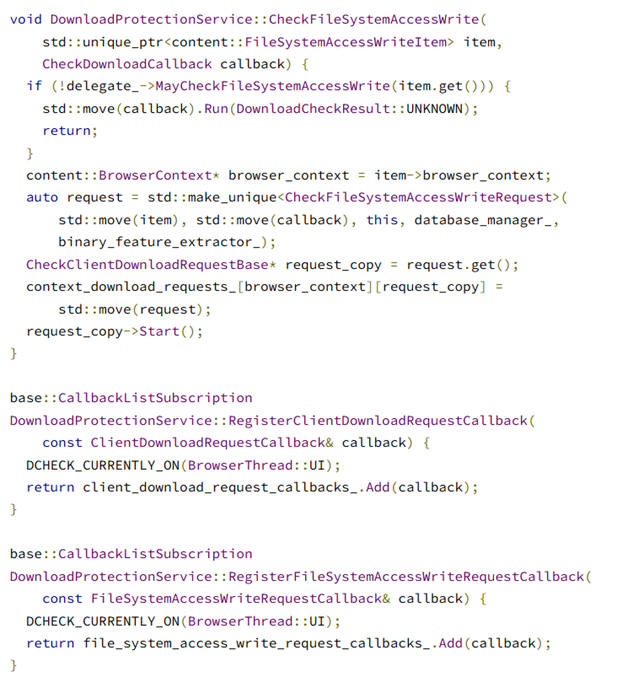
At this stage, Chromium receives a FileSystemAccessWriteItem, checks whether the delegate allows a protection check for that write operation, and if allowed, creates a CheckFileSystemAccessWriteRequest and starts the inspection flow.
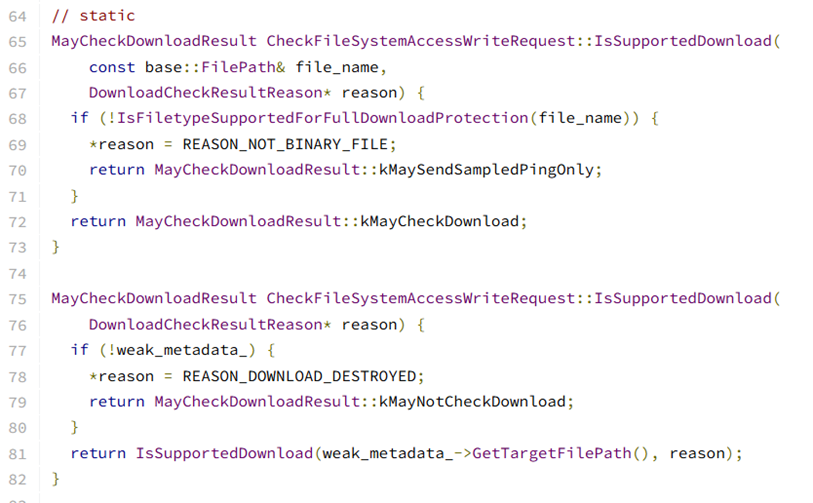
As seen above, the IsSupportedDownload path checks whether a file type is eligible for a full inspection route and may downgrade to a narrower path when it is not. As a result, not every write-back operation receives identical treatment. Chromium considers file characteristics, classification, policy constraints, and route eligibility.
In my research scenario, this constraint was handled through narrative design: content was represented under a non-EXE extension, and users were socially guided to restore the extension afterward.
Chrome vs. Edge
Both are Chromium-based, so the File System Access API layer is very similar at the web-platform level.
However, the reputation and protection layer is not identical. Chrome relies on Google Safe Browsing, while Edge integrates Microsoft Defender SmartScreen. Microsoft documents SmartScreen as protection against phishing/malware sites, suspicious applications, and potentially malicious downloads; Edge documentation also notes that relevant URL/file signals can be sent to SmartScreen services for reputation checks.
In my lab tests, Edge did not block folder-file access and editing in the same way as Chrome. Because of that, the client-side logic included browser-aware branching with a different narrative model per browser capability.
The research meaning is that the primitive is the same, but defensive response can differ. The same workflow can pass through different decision engines because each browser wraps Chromium with its own reputation, policy, and security UX layers.
Demo
Note that both videos show Rogue Sandbox.
In the first demo, executable-file editing is demonstrated through Microsoft Edge browser in a controlled lab context.
In the second demo, executable-file editing is demonstrated through Google Chrome browser with a non-protected extension narrative and controlled follow-up flow.
For convenience, the project is available here for review and feedback: Rogue Sandbox project repository
What Can Be Done Defensively?
This is offensive research, but the defensive implications are unavoidable. If a browser can obtain write permission to a local folder and modify existing files under legitimate user consent, organizations should treat File System Access API as a permission surface with real security impact.
The point is not to block browsers entirely. File System Access API is legitimate and useful. The problem is that many organizations still model browsers mainly as upload/download endpoints, not as local-file editors.
Organizational Recommendations
- Configure browser policy to limit or control site requests for read/write filesystem access.
- Allow File System Access only for known and approved origins where business need is explicit.
- Train users that folder permission is not equivalent to normal upload; it is permission to operate on local files.
- Monitor browser processes writing to many files or changing sensitive extensions.
- Treat file modifications by
chrome.exeormsedge.exeas behavioral signals that require context.
Additionally, both Chrome and Edge provide enterprise policies to control how sites request filesystem read/write access. In organizations without a clear business requirement, blocking or tight allowlisting is worth considering.
Conclusion
Rogue Sandbox is not a sandbox-escape story. The browser did not break its boundaries. It operated exactly as designed: user gesture, folder selection, permission grant, and origin-scoped capability.
The issue is that users and browsers interpret the same event differently. The user sees scanning, cleanup, and protection. The browser sees handle, permission, and write. Rogue Sandbox lives in that interpretation gap.
The research started from browser-based encryption concepts and moved into a broader direction: if browser-mediated encryption is possible under user-granted scope, other controlled file modifications are possible too, including client-side infection demonstrations in lab settings.
The novelty is not that browsers are inherently “dangerous”. The novelty is that browsers have become local execution-adjacent environments driven by user-granted permissions. When credible narrative drives write consent, the scanning environment itself can become the payload path.
The user did not download a new file. The user allowed a site to edit a file that was already present. That is the distinction many defense models still fail to account for.
Research Notes
This section captures important observations that did not fit the main flow but are worth preserving.
Safari and Firefox
The full showDirectoryPicker() + local-folder readwrite model is not supported in the same way across all browsers. Safari and Firefox do not currently expose the same operational surface as Chromium in this context.
Chrome on Android
Check Point highlighted Chrome on Android relevance for media-folder scenarios. This research focuses mainly on desktop because controlled modification of existing executable formats is more relevant to Windows desktop workflows.
Sensitive Directories
Chromium does not provide unrestricted path access. It includes checks for sensitive directories and entries, including symlink-to-blocked-location scenarios. This model does not bypass those checks; it leverages user-selected, non-blocked areas.
startIn and Full-System Access
startIn does not grant root or full-system access. It only influences picker starting location. Actual access remains dependent on user choice and browser enforcement.
User Gesture
The user-gesture requirement is important but does not prevent social engineering. If users click Scan within a believable narrative, the technical requirement is satisfied.
Cloud Sync
A relevant future direction is synced folders such as OneDrive, Google Drive, or Dropbox. Browser-mediated local edits may be propagated by sync clients. This was not the primary attack case here, but it is an important follow-up direction.
Digital Signatures
Modifying signed files is expected to break signatures. This can become both a detection signal and a technical limitation. The current demo does not rely on signature bypass.
EDR Visibility
EDR products may observe chrome.exe or msedge.exe writing local files. However, absent rapid high-volume file churn, this activity may remain low-noise and under-classified.
Safe Browsing Is Not Only Phishing
The research indicates that Safe Browsing relevance extends beyond phishing-page and classical-download scenarios. Chromium includes dedicated write-inspection paths for File System Access operations, but behavior still depends on file type, classification, and browser policy.